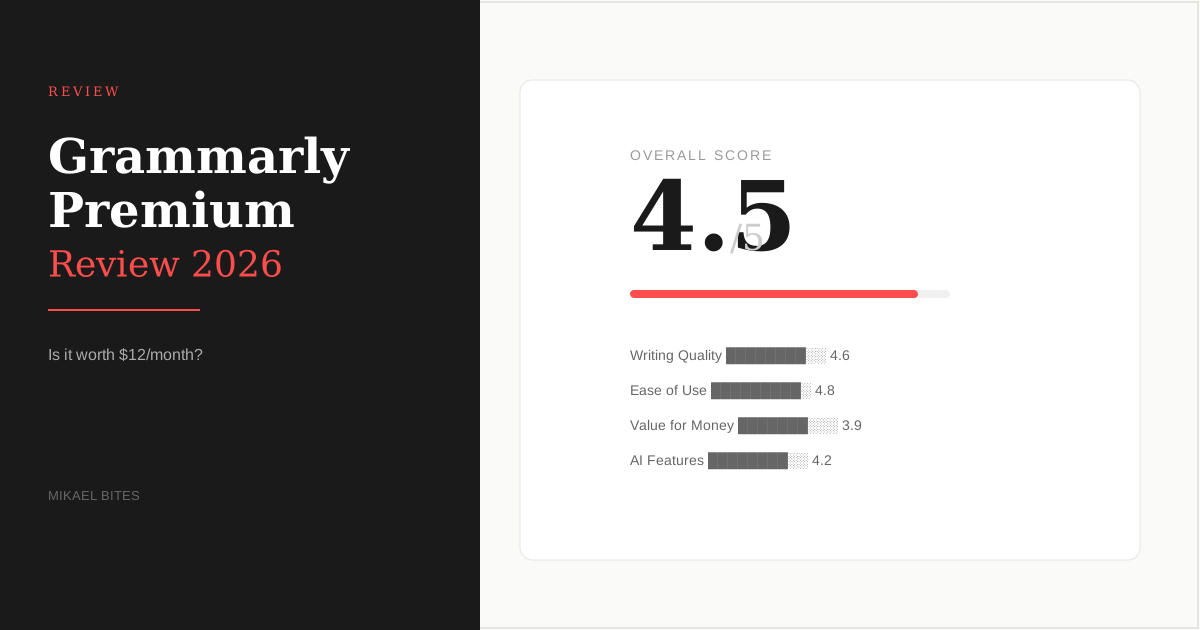
Grammarly Premium is worth it if you write daily and need more than basic spelling and grammar checks — the tone detection, clarity rewrites, and plagiarism checker genuinely improve output. If you only write the occasional email, the free version covers you fine.
What Is Grammarly Premium?
Is Grammarly Premium worth it? That's the question I set out to answer after using it daily for six weeks across blog drafts, client emails, and social captions. Grammarly started as a free grammar checker browser extension and has grown into a full writing assistant that lives in your browser, desktop apps, Google Docs, Microsoft Word, and most places you type.
The free version catches spelling mistakes and basic grammar errors. Premium adds tone detection, full-sentence rewrites, a plagiarism checker, vocabulary enhancement suggestions, and genre-specific writing style feedback. For anyone publishing content regularly — blog posts, emails, social copy — the gap between free and Premium is bigger than the marketing pages let on.
I write for a living, so I put it through the paces on actual Mikael Bites drafts, not test sentences. Here's what I found.
Who Makes It and Can You Trust Them?
Grammarly Inc. was founded in 2009 and is based in San Francisco. It's one of the oldest and most established players in the AI writing space — well before "AI writing tool" was even a category. The company reports over 30 million daily active users, which puts it in a different league of scale than most competitors in this niche.
Grammarly has been transparent about how it handles data: it doesn't sell your writing to train third-party models, and it offers enterprise-grade privacy controls for teams that need them. That matters if you're pasting in client work or unpublished drafts, which most content writers do constantly.
The product has been stable and consistently updated for over a decade. That track record is rare in a market full of AI tools that launch, get funded, and disappear within two years.
Key Features
Real-Time Grammar and Spelling Checks
This is the baseline, and it's still the most reliable part of the product. Grammarly catches subject-verb agreement errors, misplaced commas, and typos as you type, with suggestions that are almost always correct. I rarely disagree with a grammar catch — it's the most trustworthy layer of the tool.
Tone Detection
Premium adds a tone indicator that flags how your writing will likely read to someone else — formal, friendly, confident, tentative, and so on. I found this most useful in client emails, where I sometimes write too bluntly under deadline pressure. Grammarly flagged three separate emails as "could come across as demanding" before I sent them, which was a fair catch each time.
Full-Sentence Rewrites
This is the feature that separates Premium from the free version most clearly. Instead of just flagging a problem, Grammarly suggests a full rewritten sentence for clarity, conciseness, or engagement. On a 2,000-word blog draft, it typically suggested 15-20 rewrites. About half were genuine improvements; the rest I ignored because they flattened my voice into something more generic.
Plagiarism Checker
Premium includes a plagiarism checker that scans against billions of web pages and academic databases. For content marketers publishing SEO articles, this is a real safety net — it catches accidental over-paraphrasing from source research, which search engines can penalize even when it's unintentional.
Vocabulary and Word Choice Suggestions
Grammarly suggests alternative words when you're repeating the same term too often or using something vague. On a draft where I used "great" six times, it flagged four instances with sharper alternatives. Small thing, but it adds up over a full article.
Genre-Specific Style Checks
You can tell Grammarly what kind of writing you're doing — academic, business, creative, casual — and it adjusts its suggestions accordingly. A business email gets different tone feedback than a blog post. This context-awareness is genuinely useful and something the free version doesn't offer at all.
Pricing — Is It Worth It?
Grammarly's pricing structure looks like this:
| Plan | Price | Best For |
|---|---|---|
| Free | $0 | Basic spelling and grammar only |
| Premium | $12–$30/month (billed annually vs monthly) | Individual writers, bloggers, freelancers |
| Business | $15/member/month | Teams needing brand consistency and admin controls |
Premium pricing varies significantly depending on billing cycle — the annual plan brings it down to roughly $12/month, while month-to-month runs closer to $30. If you're committing to it, the annual plan is the only version that makes financial sense.
Is it worth it? For anyone writing daily — bloggers, freelance writers, content marketers, anyone sending client-facing emails regularly — yes. The tone detection alone has saved me from sending emails I would have regretted. If you write occasionally and just need spelling caught, the free version is genuinely enough and I wouldn't tell you to upgrade.
Try Grammarly Premium free →
Pros and Cons
| Pros | Cons |
|---|---|
| Tone detection catches things spellcheck never would | Full-sentence rewrites can flatten your natural voice |
| Plagiarism checker is a genuine safety net for content sites | Pricing is confusing — annual vs monthly gap is large |
| Works nearly everywhere you type (browser, docs, desktop) | Browser extension can be sluggish on very long documents |
| 15+ years of product maturity and stability | Some suggestions are generic "safe" writing over strong writing |
| Free version is genuinely useful on its own | Business plan required for team brand voice consistency |
My Hands-On Experience
I ran Grammarly Premium against six weeks of real writing: blog drafts for this site, client email threads, and a batch of social captions.
Grammar and spelling: Essentially flawless. In six weeks I didn't catch a single false positive on a basic grammar rule. This part of the tool has clearly been refined over a decade and it shows.
Tone detection: This is where Premium earned its keep. Writing under deadline pressure, I tend to sound curter than I mean to. Grammarly flagged this in real client emails, not just hypothetical examples, and each time the rewrite it suggested was genuinely warmer without being fake.
Sentence rewrites on blog content: Mixed results. On a 2,200-word article, it suggested 18 sentence rewrites. About 9 were real improvements — tighter, clearer. The other 9 I rejected because they sounded more like generic content-mill writing than my own voice. If you accept every suggestion blindly, your writing starts to sound like everyone else's Grammarly-edited writing. Use it as a second opinion, not an autopilot.
Plagiarism checker: Ran it against three of my SEO articles that cited competitor research. It flagged two phrases that were closer to a source than I realized — useful catches I wouldn't have found manually.
Worst experience: The browser extension noticeably slowed down a 3,000-word Google Doc, with a couple seconds of lag between typing and suggestions appearing. Not a dealbreaker, but noticeable on longer pieces.
Best experience: Catching tone issues in emails before hitting send. That single feature justified the subscription for me during this test period.
Who Is Grammarly Premium Best For?
Best for: Freelance writers and content marketers who send a high volume of client communication, bloggers publishing regularly who want a clarity pass before hitting publish, non-native English speakers who want tone and fluency feedback, and anyone who writes professional emails daily.
Not the best fit for: Casual writers who only need occasional spellcheck (the free plan covers this), fiction writers who want their unique voice preserved without "clarity" rewrites pulling it toward generic prose, or teams needing brand-voice consistency across multiple writers — that requires the pricier Business plan.
Grammarly Alternatives to Consider
Before committing to a Premium subscription, it's worth knowing the alternatives.
ProWritingAid is a strong alternative if you want deeper style analysis — it includes reports on sentence length variation, overused words, and pacing that Grammarly doesn't offer. It's popular with longer-form writers and novelists specifically because it doesn't push toward "safe" generic phrasing as aggressively.
Hemingway Editor is a one-time-purchase tool (no subscription) focused purely on readability and sentence complexity. It won't catch every grammar error Grammarly does, but if you just want a brutal clarity pass on a draft, it's a cheaper one-time option.
ChatGPT or Claude can proofread and rewrite text if you're comfortable prompting for it, and if you're already using an AI writing tool like Jasper for drafting, its built-in editing pass may cover some of the same ground without a second subscription.
Final Verdict
Grammarly Premium in 2026 earns its subscription cost for anyone who writes daily and sends that writing to other people — clients, readers, or colleagues. The tone detection is the standout feature; it catches interpersonal friction that no basic grammar checker would ever flag. The plagiarism checker is a legitimate safety net for content publishers. The sentence rewrites are useful but need a critical eye — accept the good ones, reject the ones that flatten your voice.
Buy it if: You write professional emails or published content daily and want a second set of eyes on tone, clarity, and originality.
Skip it if: You only write occasionally, or you're a creative writer protective of a distinctive voice that generic "clarity" suggestions tend to smooth over.
Try Grammarly Premium free →
FAQs
Is Grammarly Premium worth it in 2026? Yes, if you write daily — professional emails, blog content, or client communication. The tone detection and full-sentence rewrites go well beyond what the free spelling and grammar checker offers. If you only write occasionally, the free version is enough.
What's the difference between Grammarly free and Premium? The free version checks spelling, basic grammar, and punctuation. Premium adds tone detection, full-sentence clarity and engagement rewrites, a plagiarism checker, vocabulary enhancement, and genre-specific style feedback.
Does Grammarly Premium check for plagiarism? Yes. Premium includes a plagiarism checker that scans billions of web pages and academic sources. It's useful for content marketers who want to catch accidental over-paraphrasing from research sources before publishing.
Is Grammarly Premium expensive? It depends on the billing cycle. The annual plan works out to roughly $12/month, while month-to-month billing is closer to $30/month. If you're committing to it for more than a couple months, the annual plan is significantly cheaper.
Can Grammarly Premium replace a human editor? Not entirely. It catches grammar, tone, and clarity issues reliably, but it can't judge argument structure, factual accuracy, or whether your content actually serves the reader's intent the way a human editor can. Treat it as a strong first-pass tool, not a replacement for editorial judgment.
This article contains affiliate links. I may earn a commission at no extra cost to you.